See also: Using the FITOPT Command to Control the Fit
Sets the various options related to the model fitting process.
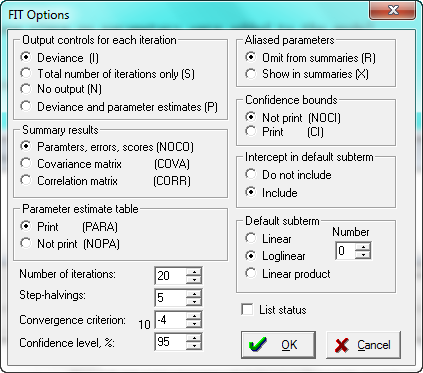
The first group of options (Output controls for each iteration) controls the amount of output printed for each iteration. The choices are to print the deviance at each iteration, only the total number of iterations, no output, or printing the deviance and parameter estimates at each iteration.
The next group of options (Summary results) controls the output in the summary of results for the fitted model. The choices are: parameter estimates, standard errors and standardized scores, all of the above plus the parameter covariance matrix, and all the above plus the parameter correlation matrix. After a model has been fit, the MODEL/BOUNDS/WALD BOUNDS command can be used to get the covariance or correlation matrix.
Whether or not the parameter estimate table is shown can be set as one of the options. It can be useful to suppress the parameter estimate table if the user is only interested in the parameter covariance or correlation matrix.
The maximum number of iterations can be changed, as well as the limit on the number of step-halvings allowed for in an iteration. Step-halving is an adjustment to the Newton-Raphson step size, which is taken if the likelihood fails to increase when the default step is taken. This adjustment involves moving in the same direction as the Newton-Raphson step, but taking only a partial step. Step-halving usually occurs when the initial estimates are very bad or when a parameter estimate is plus or minus infinity. The default convergence criteria is .0001 or 10-4. Convergence is determined using the absolute change in the deviance.
Confidence level sets the default confidence level Wald (CI command) and likelihood (BOUNDS command) bounds.
The Aliased parameters options allow you to choose whether or not intrinsically aliased parameters are included in the parameter estimate tables.
The Confidence Bounds option indicates whether or not Wald type confidence bounds are shown after each fit. The default for this is not to print these bounds since after a model is fit, confidence bounds can be calculated by using the Model / Bounds / Wald Bounds dialog or the CI command.
The Intercept in default subterm allows you to determine whether or not the intercept (%CON) is automatically included in the default subterm. In Poisson or grouped survival models and binomial probability models, the intercept would be included in the loglinear subterm of term 0. Alternatively, the user can specifically add or drop %CON to a Fit using the model specification dialog of model updating commands such as LOGLINEAR, LINEAR, or FIT. This option has no effect in proportional hazards models for ungrouped survival time models or case-control studies since this parameter is not estimable.
The term to which a model formula given by a FIT command applies is called a default subterm. The default subterm can be set to the linear subterm, loglinear subterm, or linear product subterm. To change the default subterm from term 0 of the loglinear term, the user must specify the term number as well as the term type.
Related script commands