 is positive, the models
 The material presented earlier in this chapter provides information about how models are specified and fit using the EPICURE regression programs. It is occasionally useful to modify features of the fitting procedure, including the output produced at each iteration and in the final model summary, the convergence criterion, the maximum number of iterations, or even the subterm described by model formulae given with the FIT command. As examples in the next chapter illustrate, the standard model summary table produced for each fit contains the parameter estimates and their asymptotic standard errors for each parameter in the model. The default summary table does not include the parameter covariance or correlation matrix or confidence bounds for specific parameters. The FITOPT command is used to control various aspects of the fitting process. This section does not cover all of the FITOPT subcommands. For more information see FITOPT in the EPICURE Command Summary.
The first options we consider control aspects of the fitting process. These options include ITER which changes the maximum number of iterations (default 20); CONV, which changes the current convergence criterion (default .0001); and HALF, which controls the maximum amount of step halving (default is five steps on two consecutive iterations).
There is little need to change the maximum number of iterations when the programs are being used interactively, because the FIT command without any arguments will cause the previous model to be refit using the final parameter values from the most recent fit as starting values. The convergence criterion in all of the EPICURE programs is based upon the absolute change in the log-likelihood function. In addition to checking the change in log-likelihood, the programs also check the score statistic at the final iteration and print a warning when this number is large relative to the convergence criterion. The argument for the CONV subcommand is the base 10 logarithm of the desired convergence criterion. The following command changes the convergence criteria to 0.001:
FITO CONV -3 @
The programs recognize FITO as the FITOPT command because, with the exception of a limited number of subcommands for which five characters are used, only the first four characters of a command or subcommand are checked.
There is little need to change the step halving default.
Failure to converge because of excessive step halving is usually a sign of bad
starting values or a poorly specified model. The most common model specification
problem involves attempts to estimate the logarithm of a parameter whose maximum
likelihood estimate is negative. For example, if is positive, the models

and

are equivalent to 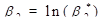 . However, if
  is not positive, the second
model is poorly specified and cannot be fit. Assuming that product additive
excess models are being used, the first of these two models could be specified
with the commands.
is not positive, the second
model is poorly specified and cannot be fit. Assuming that product additive
excess models are being used, the first of these two models could be specified
with the commands.
LOGL 0 %CON @
LINE 1 dose @
while the commands
LOGL 0 %CON @
LINE 1 dose=1 @
LOGL 1 %CON @
would specify the second model. Note that in the latter specification the parameter associated with the dose covariate is initialized and fixed at 1.0.
In normal operation, progress in fitting a model is reported in an iteration summary that indicates the iteration number, the number of step halvings (if any), and the value of the deviance. It is sometimes useful to see the parameter estimates at each iteration. The FITOPT P subcommand can be used to do this. The E subcommand is used to restore the default behavior.
In some applications, such as studies of radiation effects,
interest may center on subterms other than the log-linear component of T0.
In these cases you can change the subterm updated from the FIT command (the default subterm) by using the LINEAR and LOGLINEAR FITOPT
subcommands. For example, if most of the modeling effort centers on the
log-linear component of  , one could make this the default
subterm with the command
, one could make this the default
subterm with the command
FITOPT LOGL 1 @
The INTERCEPT subcommand is used to
force inclusion of a constant covariate in the log-linear subterm of term 0 for
AMFIT and GMBO/PECAN. The NOINTERCEPT subcommand can be used to prevent the automatic
inclusion of %CON in  . This might be useful when a
categorical variable is included in the model and when one desires direct
estimates of the effects of each level rather than contrasts between the effects
of the first and subsequent levels, which would be estimated if the model
included an intercept. Explicit removal of %CON from the appropriate term is
equivalent to FITOPT NOINTERCEPT, while explicit
addition of %CON turns on the automatic intercept
option. In PEANUTS
and for conditional regression in GMBO/PECAN an intercept is implicit in any
model fit, so these fit options have no effect.
. This might be useful when a
categorical variable is included in the model and when one desires direct
estimates of the effects of each level rather than contrasts between the effects
of the first and subsequent levels, which would be estimated if the model
included an intercept. Explicit removal of %CON from the appropriate term is
equivalent to FITOPT NOINTERCEPT, while explicit
addition of %CON turns on the automatic intercept
option. In PEANUTS
and for conditional regression in GMBO/PECAN an intercept is implicit in any
model fit, so these fit options have no effect.
The final fit option to be discussed here concerns automatic computation of confidence intervals or parameter covariance or correlation matrices. The default model summary does not include confidence bounds or covariance matrices for individual parameters. The FITOPT CI subcommand can be used to request that Wald-type confidence bounds be printed after each fit. By default these will be 95 percent bounds. The level can be changed with the LEVEL subcommand. The COVA and CORR subcommands are used to request printing of the covariance and correlation matrices, respectively, after each fit. It is not possible to print both the covariance and correlation matrices after a fit. The NOCI subcommand is used to cancel automatic printing of the confidence bounds, while the NOCO subcommand is used to stop printing of the covariance or correlation matrix.
We conclude this section with two FITOPT command examples. In the first example the convergence criterion is changed to be 0.001, and it is requested that 90 percent confidence bounds and the parameter correlation matrix be printed after each fit. In addition, the maximum number of iterations is changed to 50. This can be accomplished with the command
FITOPT CONV -3 CI LEVEL 90 CORR ITER 50 @
In the second example we will change the default subterm to be
the linear subterm of and turn off automatic printing
of confidence bounds. The command to do this is
FITOPT LINE 1 NOCI @
If you want to list the fit options currently in effect, you can include the LIST subcommand or use the FITOPT@ command.